
Construction Project Schedule and Gantt Chart Software with Critical Path
Critical path recalculated in 15 minutes, not a full afternoon
Upload your contract document and get a working Gantt. Adjust one milestone and the critical path updates across the whole project immediately. No save-and-wait cycle.
Every reschedule in MS Project takes half a day
When one milestone slips, every dependent task needs to be manually cascaded. In Primavera or MS Project, that means reopening the file, updating dates, waiting for the software to recompute, and exporting a new PDF. Meanwhile, the site is already working to last week's schedule.
The planning engineer updates the Gantt. Nobody else sees the change until the PDF arrives.
Cascading updates done by hand
Change one task end date and you adjust every downstream dependency manually. On a 200-task Gantt, that's an afternoon's work.
P6 recomputes when you save, not as you type
On large projects, waiting for critical path to recalculate takes minutes. Crash the file mid-session and you start again.
Schedule lives on one person's laptop
The planning engineer's P6 file is the source of truth. When they're on leave, updates stop.
Progress requires manual re-entry
Field progress from daily logs gets typed into the Gantt separately, creating a lag of days between what happened and what the schedule shows.
Site team works from a PDF
The updated schedule is emailed as a PDF. By the time it reaches site, it's already out of date.
No baseline comparison
You know the schedule slipped, but not when it started or by how much relative to the original baseline.
Gantt built from the contract. Updated from the field.
Upload the awarded contract document. CivilBolt extracts project milestones, scope items, and end dates automatically. Adjust any task and the critical path recalculates immediately across the whole project.
Your planning engineer adjusts the Gantt. Your PM sees the update in real time.
Contract-to-Gantt in 30 seconds
Contract document extracted at upload. Tasks, milestones, and end dates auto-populated into the Gantt before you've opened another application.
Instant critical path recalculation
Change one date and the critical path updates across the whole project immediately. No save cycle, no waiting.
Field progress flows into the schedule
Daily log entries update task completion directly. The Gantt stays current without a separate re-entry step.
Baselines and variance tracking
Freeze the baseline schedule at contract award. Compare current vs planned at any point to see exactly when and where the programme started slipping.
Shared live schedule for the whole team
Planning engineer, PM, and site engineer all see the same Gantt. No more PDF distributions, no more out-of-date versions.
Dependencies with lag and lead time
Set finish-to-start, start-to-start, finish-to-finish, and start-to-finish dependencies with lag or lead. All recalculate automatically.
From contract to live Gantt in three steps
No Primavera licence. No data entry from scratch.
Upload the contract document
CivilBolt extracts the project name, value, milestones, start and end dates from the PDF. The Gantt is populated in 30 seconds.
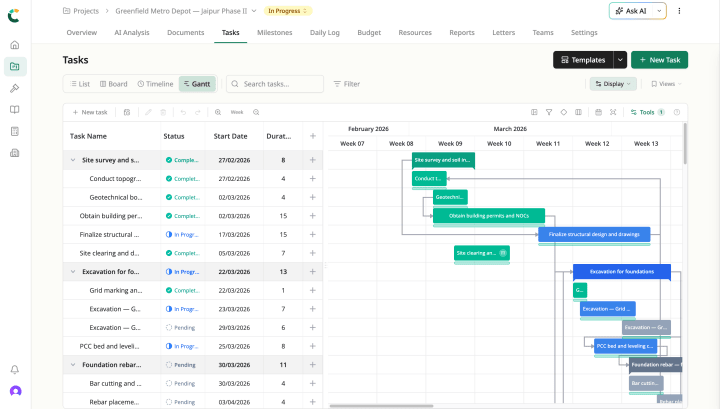
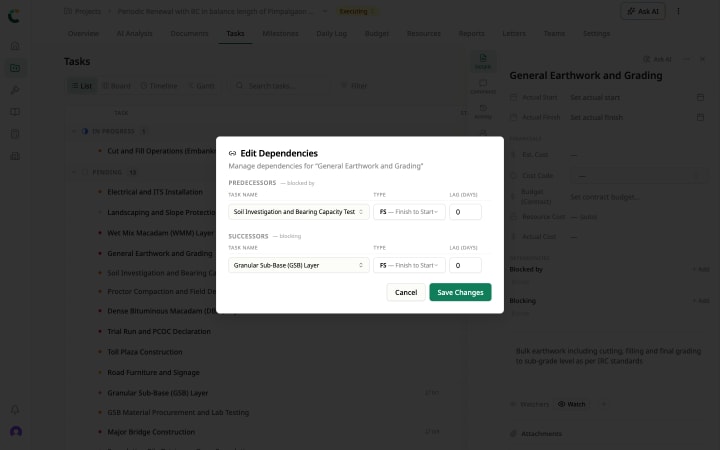
Add dependencies and adjust milestones
Drag tasks, set dependencies between activities, adjust durations. Critical path recalculates immediately on every change. No manual cascade.
Field progress updates the schedule daily
Site engineers log progress in daily logs on mobile. Task completion flows into the Gantt automatically. The schedule stays current without a separate re-entry step.
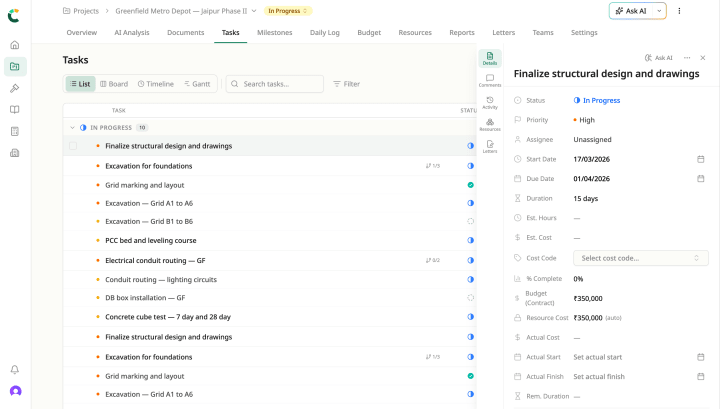
Inside the project management workspace
Schedule & Gantt ships alongside the rest of the Project Management workspace. They share the same uploaded document, the same project record, the same Civil Brain reading across all of them.
See the Gantt built from your contract
Custom quote · 14-day pilot on a live project · Implementation in 2–4 weeks.
Critical path
Move one duration. The whole plan follows. Drag a task longer and watch dependents cascade, the critical path shift, and the finish date move.
Completion
Week 16
Critical path
5 of 6 tasks
Drag a bar’s right edge to change its duration.