
Construction Daily Site Log and Field Reporting Mobile Software
Daily site log in 10 minutes on mobile
Manpower, equipment hours, weather, quantities, delays, and photos. Logged at end of shift from any mobile browser. PM dashboard updates live as entries come in.
Paper site diaries take 45 minutes and arrive two days late
A site diary filled in at end of shift sits on a foreman's desk until someone collects it, types it up, and emails it to the PM. The PM gets yesterday's data, at best. During a delay dispute, the only record is a scanned handwritten diary that may or may not be legible.
By the time the report reaches the PM, the delay has already happened.
45-minute paper site diary
Manpower, equipment, weather, quantities, and delays. All written by hand at end of shift, then typed up again at the office the next morning.
Progress updates require a call
The PM calls the site engineer to find out where the project stands. The answer depends on who picks up and what they remember.
Photos go into a WhatsApp group
Photos of site conditions, rework, and delays are sent to the group chat. No link to the task, the date, or the delay event they document.
No standard format across the team
Different engineers fill in the diary differently. Cross-project comparison is impossible. Finding a specific entry takes minutes even if you know what you're looking for.
Delays not captured until too late
A plant breakdown logged on paper reaches the PM two days later, after the subcontractor has mobilised elsewhere and the delay is already embedded in the programme.
Disputes without a proper evidence trail
During a delay claim, the contractor needs to prove what happened on site on a specific date. Paper diaries rarely survive intact, and scanned PDFs don't hold up well in adjudication.
10 minutes at end of shift. Evidence trail from day one.
The field log on mobile captures manpower by trade, equipment hours, weather conditions, quantities completed, delay events, and photos. All entries are linked to the project, the task, and the date. The PM dashboard updates as submissions come in.
Site engineers log from their phone. The PM sees it without making a call.
Structured mobile form, not a blank text box
Manpower by trade and headcount, equipment by type and hours worked, weather code, work quantities, and delay events, all captured in structured fields that make the data usable later.
Photos attached to the record
Photos uploaded from the phone are linked to the daily log entry, the date, and the task. Not dumped in a group chat.
PM dashboard updates as entries come in
Submissions from site appear in the PM dashboard immediately. Programme health, manpower trends, and delay events visible without a phone call.
Delay events logged with a timestamp
Log a plant breakdown, a drawing issue, or a rain stoppage with a timestamp and a link to the affected task. The record is created the moment it happens.
Searchable audit trail across all projects
Find what happened on any date, on any project, in seconds. Filter by delay type, weather event, or manpower category.
Field data flows into the schedule
Task completion logged in the daily entry updates task progress in the Gantt automatically. The schedule stays current without a separate re-entry step.
From site to dashboard in three steps
Works on any mobile browser. No app download required.
Open the daily log on mobile at end of shift
Access from any mobile browser. Pre-filled with today's date, the project, and the active task list. No login app to install.
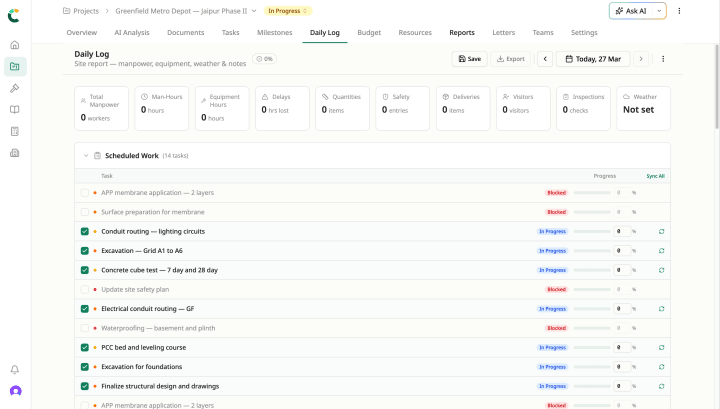
Fill in manpower, equipment, quantities, and delays
Structured form fields. Manpower by trade and count, equipment by type and hours, weather code, quantities by activity, delay events with cause and duration. Takes 10 minutes for a typical site day.
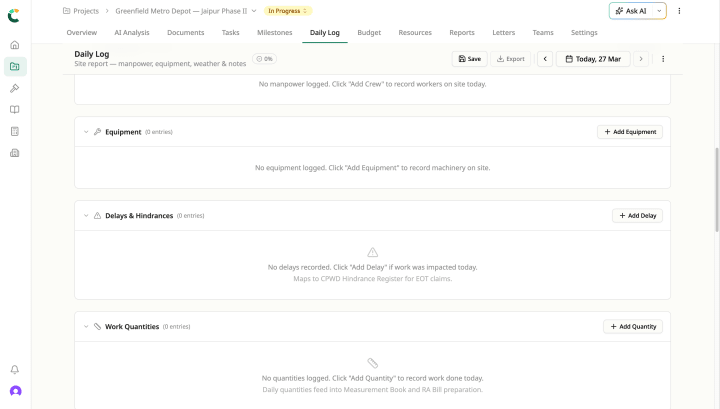
Submit and sync
Entry submitted from site. PM dashboard, task progress, and the project audit trail all update immediately. No office re-entry required.
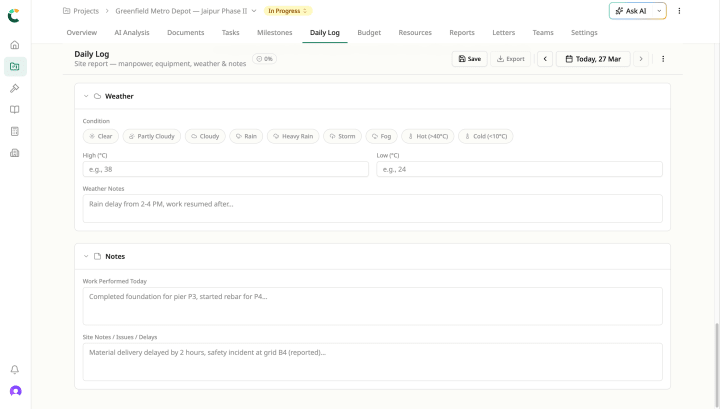
Inside the project management workspace
Field Logging ships alongside the rest of the Project Management workspace. They share the same uploaded document, the same project record, the same Civil Brain reading across all of them.
Replace the paper site diary with a 10-minute mobile log
Custom quote · 14-day pilot on a live project · Implementation in 2–4 weeks.